Showing posts with label video streaming. Show all posts

Tuesday, August 19, 2014

Setting up Windows Media Player for streaming video to HDTV

Summary: Are you looking for a guide which can help you set up Windows Media Player for streaming video to HDTV? Now, Don’t worry anymore. In this article, you can know how to set up a Windows 8.1/8 PC as a DMS and stream from PC to HDTV via the “Play To” feature of Windows Media Player. 
   

Preparation: 
  
Make sure both the DLNA compliant HDTV and your PC are connected to your home network and you have Windows Media Player 12 or later version installed on your PC. 

Step-by-step: stream videos from PC to DLNA HDTV. 

1. Setting up Windows Media Player for video streaming 

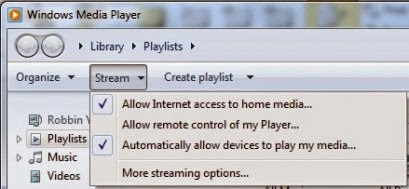
First, make sure all your photos, videos, and music are in the right libraries and that you are allowing them to be shared in your home group. Then, load Windows Media Player and hit the big “Stream” button and check “Allow Internet access to home media…” to allows for video streaming to DLNA compliant devices. 


In the Internet Home Media Access dialog box, click Allow Internet access to home media. For security reasons, you are advised to click “Link an online ID”and input your Windows Live ID and password.
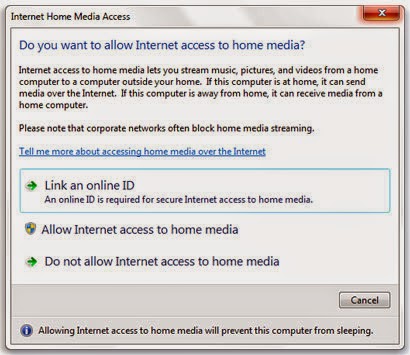


Once this is done, Windows Media Player is ready to allow media to be streaming and playing on DLNA HDTV. 

2.Pushing/Streaming PC videos to DLNA compliant HDTV

It is easy to push media to the TV while using your computer, simply right click on the video file you’d like to stream, choose your TV under “Play To” option in Windows Media Player. 
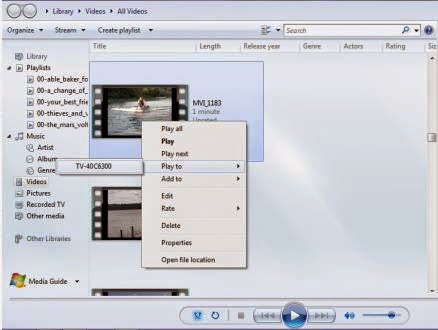

   
Now the wired DLNA HDTV should ask if you want to play the video.  Press “Allow”and your video should start streaming to your TV.

   

Notes:
1. Windows Media Player 12 (bundled with Windows 8.1) supports all DLNA roles. Windows Media Player 11 reportedly supports DLNA, but there appear to be problems.

2.If you’re not sure if your TV is DLNA-certified, search info at DLNA Certified Productsand see if it is a DLNA compliant HDTV.

3.Not all the videos can be streamed from PC to HDTV via DLNA. Only specified media formats (MPEG-1, MPEG-4 and WMV 9) are good for DLNA video streaming. Errors occur in case of unsupported video format. Native formats for DLNA media streaming: 

4.To stream MKVBlu-rays and DVDs to PC hard drive and your PC a DMS for streaming to HDTV and other DLNA certified devices like PS3 and Xbox 360.

Thursday, August 14, 2014

Stream videos to WD TV Live Plus/ Live Hub via DLNA

Recently I have become the owner of (Western Digital) WD TV Live media player which supports full HD video and wireless network connectivity. It’s a small piece of box with great features that can enhance your multimedia experience. Also the LAN port and wireless capability can fulfill the network share access and accessing media servers in home network. As a beginner, you may also don’t know what is the DLNA? How does it work? How to share PC movies to WD TV Live Plus or Live Hub (Both are DLNA certified)? This guide will give you the best answer. 
 
stream-movies-to-wdtv-with-dlna

How to Freely play the converted videos on WD TV Live media player? 

One choice: You can copy the MP4 videos on your removable hard disk and then transfer them to WD TV for playing.

Another choice: Build a situation of DLNA, and then directly stream and play the converted videos restored on your PC hard drive with WD TV.
  
Here, I find some information about DLNA, a helpful post for beginners that wanna share PC movies to WD TV Live Plus or Live Hub (Both are DLNA certified):

What is DLNA?

Digital Living Network Alliance (DLNA) is a cross-industry organization of consumer electronics, computing industry, and mobile electronics manufacturers. DLNA actively promotes wired and wireless networks of consumer electronics products, personal computers, and mobile devices, in the home and on the road, for sharing new digital media and content services. 

DLNA: common problems

First of all, file formats can be a bit of an issue. Some DLNA devices might play MP4 video files, but the device the MP4 is being sent to may be unable to recognise this particular file type. The same goes for the popular DivX video file type that many LG TVs support.

There’s usually a workaround that involves using media servers (such as TVersity) to encode content on the fly. But this can be problematic to set up for those unused to playing with such advanced settings.

Digital Rights Management (DRM) is another stumbling block. DRM controls the way that people can share digital media in order to protect copyright. Some devices, despite being DLNA-certified, won't share certain music or video files with other devices due to DRM restrictions in place.

“DLNA was created so that all the different devices, media players, TV, bluray players, game consoles, picture frames, mp3 players could share media in the home. Most of these devices do not support samba, logins, security or special file systems. So DLNA solves that problem.

Right click the folder you want to share with the WDTV and pick include in library. It does not move the folder , it merely places a link to it in your library. Then turn on media streaming. On the WDTV box look under media servers and the files will be there. No passwords, security or anything to mess with. People should get familiar with DLNA now because it will be used in the future for all devices sold for the home. Things like digital picture frames are not going to come with support for  samba and file sharing .

Another reason to use it is that windows 8.1 will ask the WDTV box what it supports before it streams. If windows 8.1 can play a file but the WDTV box cannot then windows 8.1 will automatically transcode the file . Meaning that if you can make windows 8.1 play a file then it will always play on the WDTV regardless of whether the box supports it or not. It does not always transcode files either, so things like MKV will play in their native format, so don’t worry about windows 8.1 messing with the picture quality on supported files.

Of course you are free to keep trying to use samba and making all your files compatible with that and having to change things around every time you buy a new device. But I prefer to go ahead and learn how to use DLNA , setup my files and network for it and buy new devices, bring them home, plug them in and they work without me having to mess with settings or my network. “

For more information on media streaming open help and support in windows and type streaming in the search, it details the whole process.

There are also DLNA servers you can install on your pc and they do not need passwords/file sharing setups either. If you want to knwo the Integration between DLNA media player and your home entertainment system, you can read:Full Guide

  
After you read this articles, you may want to know more information about DLNA or WD TV Media Players solutions. Just Like: 
   
A. Can I play commercial DVDs on WD TV Mini Media Player?
B. How to Create AC3 5.1 channel MKV for WD TV from my whole Blu-ray and DVD movies? 
C. The best way to Copy DVD as VOB File to WD My Cloud for Playback via WD TV Live. 
D . How to Encode Blu-ray to Lossless MKV via Synology 415play on WD TV 2? 
E. Is there any way to Make MKV files Compliant for streaming over DLNA?